
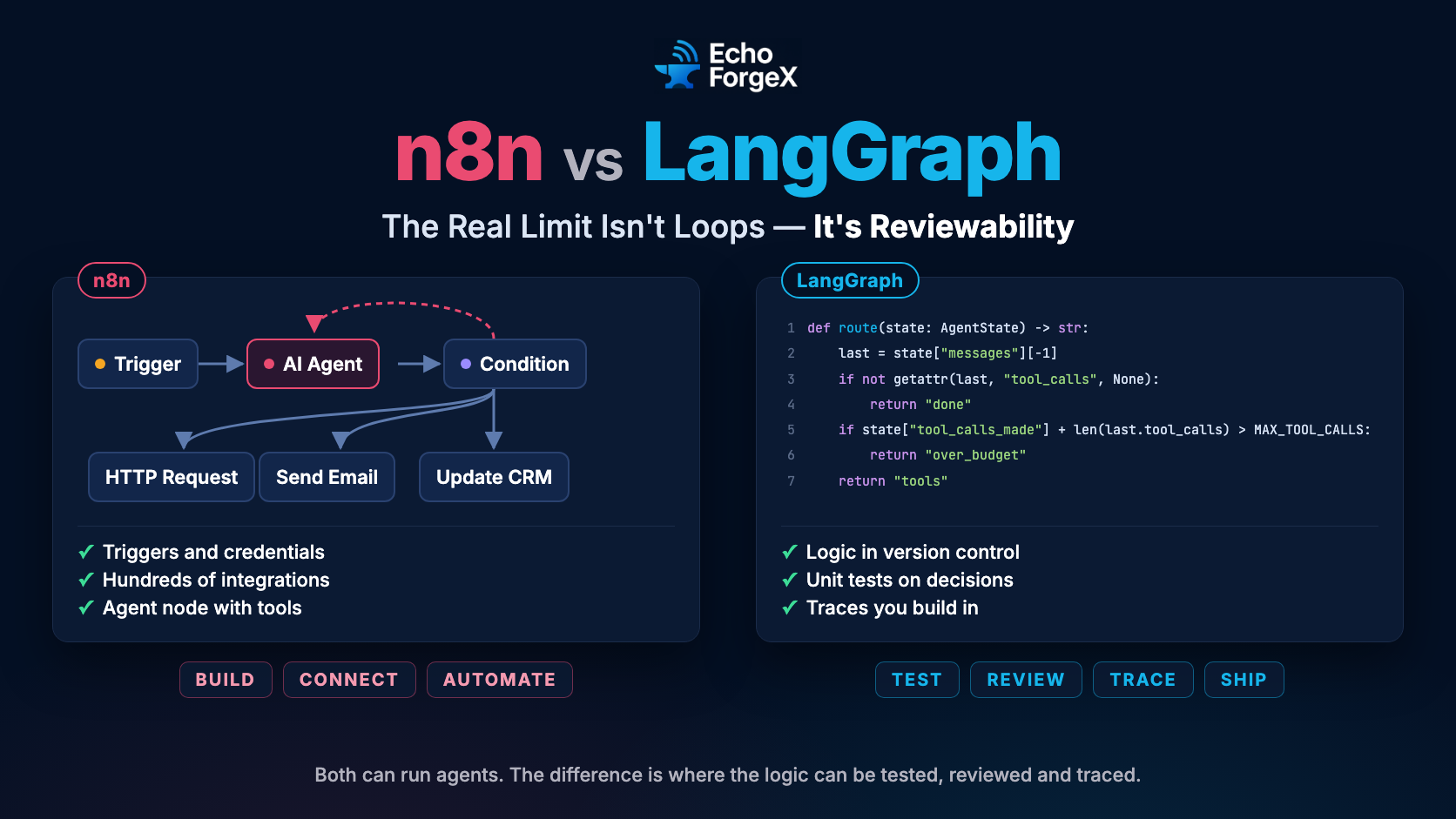
n8n vs LangGraph is no longer a question of which one can run an agent. Both can. n8n ships an AI Agent node that decides which tools to call, and Flowise’s Agentflow V2 has loops, conditions and shared state. The question that decides how an agent holds up in production is where its logic lives once it grows: somewhere you can test, diff, review and trace it, or inside a canvas built for connecting SaaS tools. That is an architecture decision, not a tooling preference.
Where Each Camp Breaks Down in Production
The pattern to watch for in visual builders — Zapier, Make, n8n, Flowise — is not that they cannot branch or loop. It is that decision logic accumulates in node configuration: a prompt in one panel, a condition in another, an expression that reaches back three nodes for a value. Each piece works. Together they become a system nobody can review as a whole.
A concrete example: a customer triage agent that must (1) classify intent, (2) retrieve account history, (3) escalate based on intent class and account tier together, and (4) log the routing decision with a structured trace. Every step can be built in n8n. The hard part is step 3 six months later, when the escalation rule changes. In the builder, the rule is an expression inside a node and the test is a manual run. In code, the same rule is one function with a unit test, and the change is a diff someone reviews.
The code-first camp has its own failure mode. Teams building directly on LangChain, LlamaIndex, or raw API calls ship agents that work on a developer’s machine and degrade in production because there is no visibility layer. The agent fails silently. A function call returns a malformed tool response. The retry loop burns tokens. Nobody knows until a user reports it or a cost alert fires.
Research on LLM agents gives a useful vocabulary for where the difficulty sits. Wang et al.’s “A Survey on Large Language Model based Autonomous Agents” (arXiv:2308.11432) describes agent architectures in four modules: profiling, memory, planning and action, with tool use inside action. Visual builders now cover tools and simple memory well. Planning — deciding at runtime what to do next, and recovering when a step fails — is where logic is hardest to keep reviewable on a canvas.
The ReAct pattern, from “ReAct: Synergizing Reasoning and Acting in Language Models” by Yao et al. (arXiv:2210.03629), interleaves reasoning traces with actions. On the tasks the paper tested it outperformed reasoning-only and acting-only approaches, and it made the agent’s decisions easier to inspect. Both camps can run this loop today. The difference is whether its stopping conditions, retries and budgets live in code you can test or in node settings.
The Real Limit Is Reviewability, Not Loops
Most visual builders began as integration tools: trigger, transform, send. Loops and agent nodes came later, and they work. But an agent is a stateful process with feedback cycles, and when its logic changes you want what you want for any other code: a diff, a review, a test that fails, and a trace for every run.
An agent running a ReAct loop executes this pattern at runtime:
- Observe the current state.
- Reason about what action to take next.
- Execute the action.
- Observe the result.
- Repeat until a stopping condition is met.
Step 5 is where the difference shows. In a builder, the stopping condition is a setting, such as a maximum iteration count on a Loop or agent node. In code, it is a condition you write, test and change through review. Both work on day one. Only one is reviewed the same way as the rest of your system.
Abstraction layers serve their original purpose best. Zapier was designed for SaaS-to-SaaS data movement. n8n was designed for automation engineers who want a visual representation of integration logic. Both have since added agent features, and those features are useful. They are still built on an integration model, and they are strongest where that model is.
Code-first frameworks like LangChain and LangGraph were designed for the agentic case. LangGraph explicitly models workflows as stateful graphs with cycles, not DAGs. You trade away the visual interface and built-in credential management. In exchange, you gain full control over state transitions, error boundaries, and execution observability.
Specific Markers That No-Code Tools Have Hit Their Limit
The ceiling is not a vague “too complex” threshold. It has specific markers. If two or more of the following describe your current workflow, you have probably hit it:
Conditional branching requires duplicating upstream nodes. This is the clearest signal. Some builders now offer shared state (Flowise’s Flow State, for one), so copying a “format context” node into three branches is a sign that the logic has outgrown its layout, not only a limit of the tool.
You cannot answer “what decision did the agent make at step 3 on run #482?” Builders keep an execution history for each run, but it is built for opening one run by hand, not for querying decisions across thousands of them.
Your tool call error handling is a separate workflow triggered by a failure webhook. Error handling should be co-located with the logic it protects. When it is not, recovery paths are invisible during design and unmaintainable at scale.
You are maintaining more than one version of the same workflow because a logic change is easier to copy than to express in the existing graph. That is a configuration management problem, and code has mature answers to it: branches, reviews and tests.
None of this means no-code builders are wrong for earlier-stage work. Flowise and n8n are genuinely useful for prototyping retrieval pipelines, testing prompt chains, and building internal tools where an engineer can monitor directly. The failure is in treating the prototype tool as the production runtime.
The transition point is when the workflow requires reasoning state that must persist across tool calls within a single execution, and that state starts to carry business rules. That is where logic outgrows the canvas.
Three Specific Capabilities Code-First Frameworks Provide
Code-first frameworks give you three things, in the same place as the rest of your code.
Explicit state machines. You define what state the agent carries, how it transitions, and what invariants must hold at each state boundary. LangGraph’s StateGraph makes this concrete — each node receives the full state dict and returns a partial update. The graph topology is defined in code, which means it is testable, versionable, and diffable.
Co-located error handling. In Python, try/except blocks live next to the logic they protect. Tool call failures, malformed LLM outputs, and timeout conditions are handled at the point of failure with access to the full execution context. You can implement retry with exponential backoff, fallback tools, or graceful degradation — all in the same function body.
Structured observability. With LangSmith, Langfuse, or a custom tracing layer built on OpenTelemetry, every agent run produces a structured trace: which nodes executed, what inputs and outputs passed through each, how long each step took, and what the final output was. This is table stakes for production debugging.
Here is a minimal LangGraph agent with a real loop, a tool-call budget, and error handling next to the call it protects:
from typing import TypedDict, Annotated
import operator
from langgraph.graph import StateGraph, END
from langchain_openai import ChatOpenAI
from langchain_core.messages import AIMessage, HumanMessage, ToolMessage
from langchain_core.tools import tool

MAX_TOOL_CALLS = 5

@tool
def get_account_history(account_id: str) -> str:
    """Return recent events for an account."""
    return f"No recent events for {account_id}."  # replace with your data layer

TOOLS = {"get_account_history": get_account_history}
llm = ChatOpenAI(model="gpt-4o", temperature=0).bind_tools(list(TOOLS.values()))

class AgentState(TypedDict):
    messages: Annotated[list, operator.add]
    tool_calls_made: int

def call_model(state: AgentState) -> dict:
    return {"messages": [llm.invoke(state["messages"])]}

def call_tools(state: AgentState) -> dict:
    calls = state["messages"][-1].tool_calls
    results = []
    for call in calls:
        try:
            output = TOOLS[call["name"]].invoke(call["args"])
        except Exception as exc:  # the error stays next to the call it came from
            output = f"Tool error: {exc}"
        results.append(ToolMessage(content=str(output), tool_call_id=call["id"]))
    return {"messages": results, "tool_calls_made": state["tool_calls_made"] + len(calls)}

def route(state: AgentState) -> str:
    last = state["messages"][-1]
    if not getattr(last, "tool_calls", None):
        return "done"
    if state["tool_calls_made"] + len(last.tool_calls) > MAX_TOOL_CALLS:
        return "over_budget"
    return "tools"

def over_budget(state: AgentState) -> dict:
    return {"messages": [AIMessage(content="Stopped: tool-call budget reached. Handing to a person.")]}

graph = StateGraph(AgentState)
graph.add_node("model", call_model)
graph.add_node("tools", call_tools)
graph.add_node("over_budget", over_budget)
graph.set_entry_point("model")
graph.add_conditional_edges("model", route, {"tools": "tools", "over_budget": "over_budget", "done": END})
graph.add_edge("tools", "model")  # the loop
graph.add_edge("over_budget", END)

agent = graph.compile()
result = agent.invoke({"messages": [HumanMessage(content="Why was account 1042 escalated?")], "tool_calls_made": 0})
The loop is the edge from tools back to model. The budget is a condition in route, checked before every round of tool calls, and running out of budget is an ordinary transition to over_budget, not an exception. LangGraph’s own recursion limit is still there as a backstop, but the budget you write is the one you can test.
n8n vs LangGraph: Use Both, in Layers
The pattern that actually survives production is not “pick one camp.” It is a layered architecture where visual tools handle what they are good at — trigger management, credential storage, webhook routing, and human-in-the-loop review — and code-first agents handle stateful execution.
Concretely: n8n or Make receives the inbound trigger, validates the payload, performs any credential-dependent integrations (CRM lookups, ticket creation), and then calls a code-first agent via HTTP as a single node. The agent executes with full state management and returns a structured response. n8n then handles the downstream actions based on that response.
The common mistake is to invert this: complex decision logic in the visual layer, code only for API calls. The canvas grows a branch for every exception, and every change touches several of them. Moving the decision logic into a code-first agent and reducing the visual workflow to a thin orchestration shell keeps each layer doing what it is good at.
The architectural principle is: let each layer do what it was designed for. Visual builders excel at integration orchestration. Code-first frameworks excel at stateful reasoning. The boundary between them should be a clean HTTP interface with a structured contract — request schema in, response schema out — so either side can be replaced without touching the other.
Frequently Asked Questions
Can n8n or Make handle production LLM agents at any scale?
Yes, within limits. n8n’s AI Agent node runs tool-calling agents, and simple agents run well there. The limits are the ones in this article: decision logic that is hard to test and review, and run history built for one run at a time. Once an agent’s decisions matter enough to need tests, move that logic into code and keep n8n for triggers and integrations.
When should I migrate from a no-code builder to a code-first agent framework?
Migrate when you see two or more of these signals: branching logic requires duplicating upstream context, you cannot query the agent’s decisions across runs, error handling lives in a separate workflow, or a logic change requires modifying the same condition in multiple places. Any one of these can be worked around in a builder. Two or more together usually mean the agent’s logic has outgrown the canvas.
Is LangGraph overkill for a simple RAG pipeline?
Yes. A retrieval pipeline that does not require conditional branching, multi-step reasoning, or persistent state across tool calls is a DAG. Build it as one — with LangChain’s LCEL, a simple Python function chain, or a no-code builder. Reserve LangGraph for workflows where the agent must decide at runtime what to do next based on intermediate results.
What observability stack works with code-first agent frameworks?
LangSmith is the tightest integration with LangChain and LangGraph — it captures full trace trees with token counts, latency per node, and structured inputs/outputs. Langfuse is a strong open-source alternative with self-hosting support. For teams already on OpenTelemetry, the opentelemetry-instrumentation-langchain package provides span-level tracing that feeds into any OTEL-compatible backend.
How do I enforce tool call budgets in a code-first agent to prevent runaway loops?
Track tool calls as explicit state — as shown in the code example with tool_calls_made. Add a routing check before any tool-calling node: if the count exceeds your budget, route to a graceful degradation node instead of continuing. This is a first-class state transition, not a timeout hack. The agent terminates with a structured response rather than an unhandled exception or an infinite loop.
Do visual builders have any advantages over code-first frameworks for AI workflows?
Yes: faster initial prototyping, built-in credential management, native integrations with hundreds of SaaS tools, and lower barrier for non-engineers to inspect workflow logic. These are real advantages for internal tools, proof-of-concept builds, and workflows that stay in the linear pipeline category. The mistake is treating these advantages as reasons to use visual builders for problems they were not designed to solve.
What is the right HTTP contract between a visual builder and a code-first agent?
Define a request schema with all inputs the agent needs — user message, session ID, any account context — and a response schema with the agent’s output, a structured routing decision, and an execution status field. Validate both sides with Pydantic. The visual builder treats the agent as a black-box service. This contract is what makes the layers independently replaceable without rebuilding the integration each time.
The principle to carry forward is simple. Visual builders are integration tools that have learned to run agents. Code-first frameworks are agent tools that leave integrations to you. Production systems do best when agent logic lives where it can be tested and reviewed, and integrations live where they are easiest to connect.
The hybrid pattern — visual orchestration at the trigger and integration layer, programmatic agents at the reasoning layer, with a clean HTTP contract between them — is the pattern that survives contact with production traffic, team growth, and changing business logic.
At EchoForgeX, we build AI-powered tools and help businesses integrate AI into their workflows. Get in touch to discuss your AI automation architecture.
A very well-structured read on the future of hardware infrastructure in smart cities and tech hubs. The demand for advanced processing power in the Gulf region is growing rapidly. Sourcing hardware locally via a proven AI chip supplier Dubai is a smart strategy for companies wanting to stay competitive in the AI ecosystem. Thanks for putting this together!
This post highlights exactly why hardware innovation is at the core of current tech growth. Access to top-tier components via a specialized AI chip supplier Dubai allows regional developers to stay on the cutting edge of AI deployment. Bookmarked this article!